

Purchasing a hybrid piano, a player piano, or a digital piano opens up exciting options for both the hobbyist and professional piano player thanks to a technology called MIDI.
If you’re not familiar with MIDI, check out our article “What is MIDI and Why Should You Care?” It will get you up to speed.
Currently, all of our Roland digital pianos, Yamaha Clavinovas, PianoDisc player pianos as well as our Yamaha Disklavier and Yamaha Silent Pianos use MIDI. Some can even use MIDI wirelessly over a Bluetooth connection. That means that these pianos give you more options than a traditional acoustic piano and can help you get more out of your instrument. Here are just some of the things they can do:
Make Your Piano Lessons More Fun
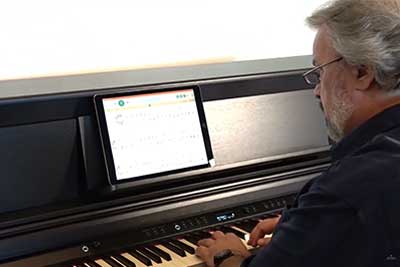 There are many programs and apps for online music lessons. MIDI allows instant interaction between your piano and the program. Once you are connected to the internet or computer using MIDI, you are ready to take virtual lessons. Faber and Faber’s Piano Adventures Player is one of our favorite lessons apps. The sheet music appears on the screen and you can either play the song back to you so you can listen or interact with the song as you play. You can mute the right hand, letting you play it, while the left hand is played by the app. You can then switch, muting the left hand and letting the app play the right hand part. In some ways, using a MIDI capable piano for virtual lessons is better than taking lessons on an acoustic piano. That’s because – with Internet MIDI – when you play your MIDI capable piano, your teacher’s MIDI capable piano will play in his/her studio (and vice versa), with no loss of audio quality! You can play back and forth in real time even if your teacher doesn’t live near you or you are feeling “under the weather.”
Find and Learn Your Favorite Songs
Let’s say you want to learn the piano part to your favorite song. Once you find and download the MIDI file, you can use a notation program like the ones above to convert the song to sheet music. If the song uses several instruments, just look for the track the piano part was created on and learn that track. …but where do you FIND these songs? That’s the best part! There are thousands of free MIDI songs available online. Just search for, “free (whatever kind of music you want) MIDI files.” This will take you to many sites. Once you find what you want you can either play or save the song. I usually play it to see if I like the way it was performed. If I do, I then save it in a folder on my desktop. I will organize the songs the way I like and then can save the songs on a USB stick. Then – when I encounter a piano with a USB flash drive port, I can insert the USB stick and enjoy all my music! Some music software and pianos allow you to use one of the pedals to turn the page! What a help!
Write Music in Real Time
 If you work with sheet music related software, such as Finale, Garage Band and Sibelius, you can connect your digital piano directly to your computer. As you play, the software can record you and produce sheet music from your performance. That’s because it’s not recording an audio sound. It’s recording a MIDI signal, including a mix of commands like which notes you played, how loud you played them, how long you held each note, pedal usage, and many other aspects of the performance. The computer records the MIDI data your piano sends and then converts it to, for example, a piano sound or music notation. Recording your piano practice into MIDI allows you to actually analyze the notes you played. Here you can correct wrong notes, edit timing mistakes and much more. You can even record on several tracks. Play the piano part first. Then as that plays back you can add a string track. Both of those tracks play back and you can add another instrument, like a flute, to the song. Soon you have a fully orchestrated song! After saving your masterpiece, you can email your song to friends or family, upload it to the internet or save it on a USB stick for later use. These songs are saved as a MIDI file and uses very little space so a small USB stick, maybe with 2gb of memory, can hold thousands of songs.
Control Other Instruments or Instrument Sounds
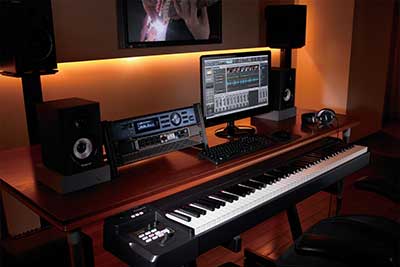 MIDI devices include player pianos, hybrid pianos, digital pianos, keyboards, sound modules and controllers that are designed to send and receive data through varied channels. Each of the channels can be used to control a unique device and can be assigned a different instrument. For example if you use a MIDI controller, you can connect and control 16 different instruments at the same time! Then you can play one keyboard but hear all the sounds from another. This is mostly used by professionals but – as MIDI gets easier and easier to use – more people are building home MIDI studios.
These are just some of the things MIDI can do for you. New apps, programs and uses are being developed every day. Why not try some of these and see what works good for you? Be sure to contact us if you have questions!


